Gazebo添加模型并控制模型运动作为动态障碍物(Ubuntu16.04, Gazebo7.16),附录动态链接库和静态链接库区别
Gazebo作为一个运动仿真环境,可以直接加载编写好的机器人模型(如TIAGo和Yumi等),也可以自己构建多个运动模型,不过稍有难度。在构建复杂运动模型前,我们需要熟悉gazebo模型设置以及插件编写、生成。Gazebo官网有介绍如何搭建小车运行模型以及加载传感器,或者网上也有一些中文教程。

1. 编写生成插件的源文件
Gazebo都是加载world文件,然后world文件中会加载各种模型,所以为了最后可以在world中设置模型的运动,一种方式就是在world文件中加载模型时导入插件,所以我们需要编写一个源程序(命名为animated_box.cc),以此来得到插件。先新建一个目录animal_box,里面存放该源文件。
#include <boost/bind.hpp> #include <gazebo/gazebo.hh> #include <ignition/math.hh> #include <gazebo/physics/physics.hh> #include <gazebo/common/common.hh> #include <stdio.h> namespace gazebo { class AnimatedBox : public ModelPlugin { public: void Load(physics::ModelPtr _parent, sdf::ElementPtr /*_sdf*/) { this->model = _parent; //使用PoseAnimation类实例化一个对象,然后通过三个参数可设置运动模型名称,运动持续时间以及是否循环执行 gazebo::common::PoseAnimationPtr anim(new gazebo::common::PoseAnimation("test", 46.0, false)); //声明一个控制模型位姿的对象 gazebo::common::PoseKeyFrame *key; //设置模型到达某位姿的时刻 key = anim->CreateKeyFrame(0); key->Translation(ignition::math::Vector3d(2.5, 0, 0)); key->Rotation(ignition::math::Quaterniond(0, 0, 0)); key = anim->CreateKeyFrame(21.0); key->Translation(ignition::math::Vector3d(2.5, 0, 0)); key->Rotation(ignition::math::Quaterniond(0, 0, 0)); key = anim->CreateKeyFrame(26.0); key->Translation(ignition::math::Vector3d(2.0, 0, 0)); key->Rotation(ignition::math::Quaterniond(0, 0, 0)); key = anim->CreateKeyFrame(31.0); key->Translation(ignition::math::Vector3d(1.5, 0, 0)); key->Rotation(ignition::math::Quaterniond(0, 0, 0)); key = anim->CreateKeyFrame(36.0); key->Translation(ignition::math::Vector3d(1.0, 0, 0)); key->Rotation(ignition::math::Quaterniond(0, 0, 0)); key = anim->CreateKeyFrame(41.0); key->Translation(ignition::math::Vector3d(0.5, 0, 0)); key->Rotation(ignition::math::Quaterniond(0, 0, 0)); key = anim->CreateKeyFrame(46); key->Translation(ignition::math::Vector3d(0, 0, 0)); key->Rotation(ignition::math::Quaterniond(0, 0, 0)); _parent->SetAnimation(anim); } private: physics::ModelPtr model; //通过事件响应来更新触发程序 private: event::ConnectionPtr updateConnection; }; //在Gazebo仿真器中注册该插件 GZ_REGISTER_MODEL_PLUGIN(AnimatedBox) }2. 编写CMakeLists.txt文档
为了对上述源文件进行编译,我们使用cmake编译,也是在animal_box目录,新建一个CMakeLists.txt文档,内容如下图,具体参数代表什么意思,可以参考该Cmake文档。
cmake_minimum_required(VERSION 2.8 FATAL_ERROR) find_package(Boost REQUIRED COMPONENTS system) include_directories(${Boost_INCLUDE_DIRS}) link_directories(${Boost_LIBRARY_DIRS}) find_package(Protobuf REQUIRED) find_package(gazebo REQUIRED) set (CMAKE_CXX_FLAGS "${CMAKE_CXX_FLAGS} ${GAZEBO_CXX_FLAGS}") include_directories(${GAZEBO_INCLUDE_DIRS}) link_directories(${GAZEBO_LIBRARY_DIRS}) # 使用animated_box.cc源文件生成插件,libanimated_box.so库文件 add_library(animated_box SHARED animated_box.cc) # 在生成插件过程中需要使用到的gazebo库文件 target_link_libraries(animated_box ${GAZEBO_LIBRARIES} ${Boost_LIBRARIES})3. 编译
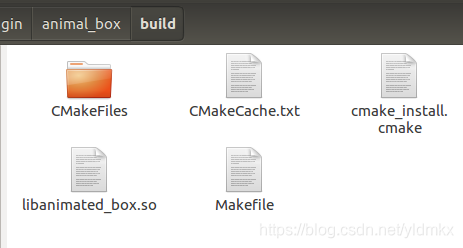
此时我们还是在animal_box目录下,新建一个build目录,然后进入buid目录右键打开终端,输入【cmake ..】命令,然后再输入【make】命令就会在build目录生成一个libanimated_box.so库文件,如下图

4. 使用插件
在得到插件后,我们需要将该插件在一个world文件中使用,仍旧是在animal_box目录下新建一个animated_box.world文件,然后加入如下代码。
<?xml version="1.0"?> <sdf version="1.4"> <world name="animated_box_world"> <!-- Ground Plane --> <include> <uri>model://ground_plane</uri> </include> <include> <uri>model://sun</uri> </include> <model name="box"> <pose>2.5 0 0 0 0 0</pose> <link name="link"> <collision name="collision"> <geometry> <box> <size>0.3 0.3 1.5</size> </box> </geometry> </collision> <visual name="visual"> <geometry> <box> <size>0.3 0.3 1.5</size> </box> </geometry> </visual> </link> <plugin name="push_animate" filename="libanimated_box.so"/> </model> </world> </sdf>此时在animal_box目录打开终端,输入命令【gazebo –verbose animated_box.world】,此时会报错找不到libanimated_box.so文件,当然了,因为我们的libanimated_box.so文件不在gazebo默认查找的库目录中,所以我们要将生成的库文件放入gazebo默认的库目录(/usr/lib/x86_64-linux-gnu/gazebo-7/plugins)中。由于权限问题,我们使用sudo命令复制,在animal_box目录下打开终端,输入如下指令,此时gazebo默认库目录下会出现libanimated_box.so文件。
sudo cp build/libanimated_box.so /usr/lib/x86_64-linux-gnu/gazebo-7/plugins/libanimated_box.so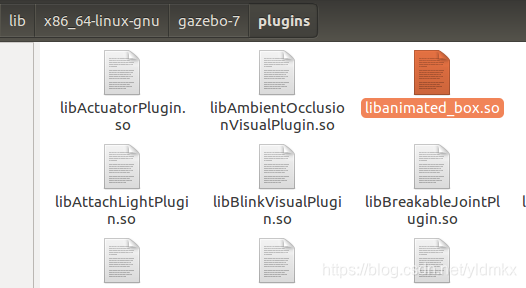
5. 运行效果
附录
1. windows动态链接库后缀名为.dll,静态链接库后缀名为.lib;Linux动态链接库为.so文件,静态链接库为.a
静态链接库会在程序链接阶段和其他.o目标文件(汇编阶段生成)一起生成可执行文件,因此在可执行文件运行时,不再需要静态库文件。而动态链接库文件只在程序运行时才被调用。因此可得静态库文件和动态库文件的特点如下:
a. 因为所有相关静态库文件被链接合成一个可执行文件,所以占用空间
b. 静态库文件更新,那么使用该文件的程序得重新编译生成再发布给用户,导致用户需要整个应用重新下载,全量更新。
c. 动态库文件更新,使用该文件的程序不用重新下载,只需要更换动态库文件即可,增量更新。
d. 不同程序调用相同的库,可以只有一份动态链接库文件,资源共享(所以也叫共享库),而且节省空间。